
Your stage moment · Updated Nov 8, 2026
Lil Yachty Walkout AI Make an entrance.
See examplesOne photo. Your face, your outfit, that festival walkout. Choose a 15-second moment and make it yours with the original sound.
Examples
The trend in the wild
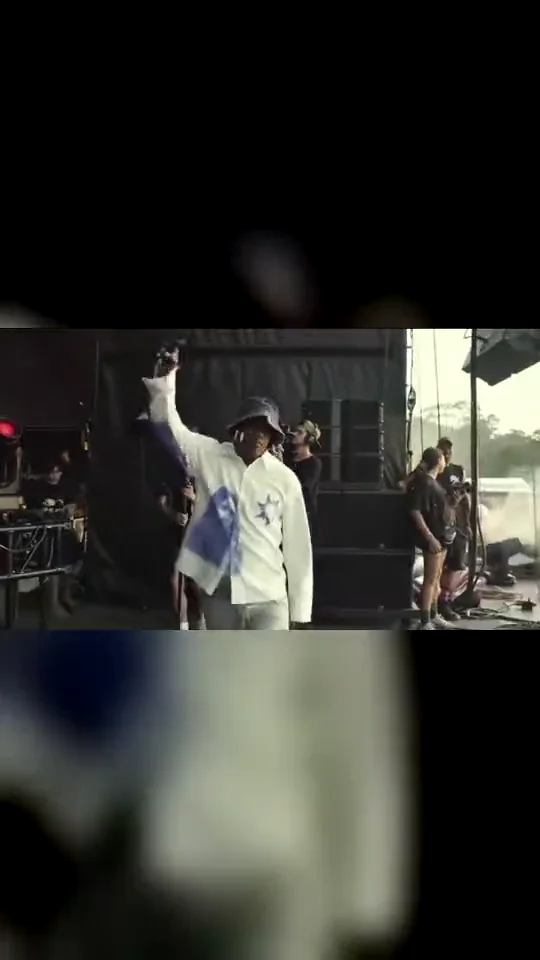
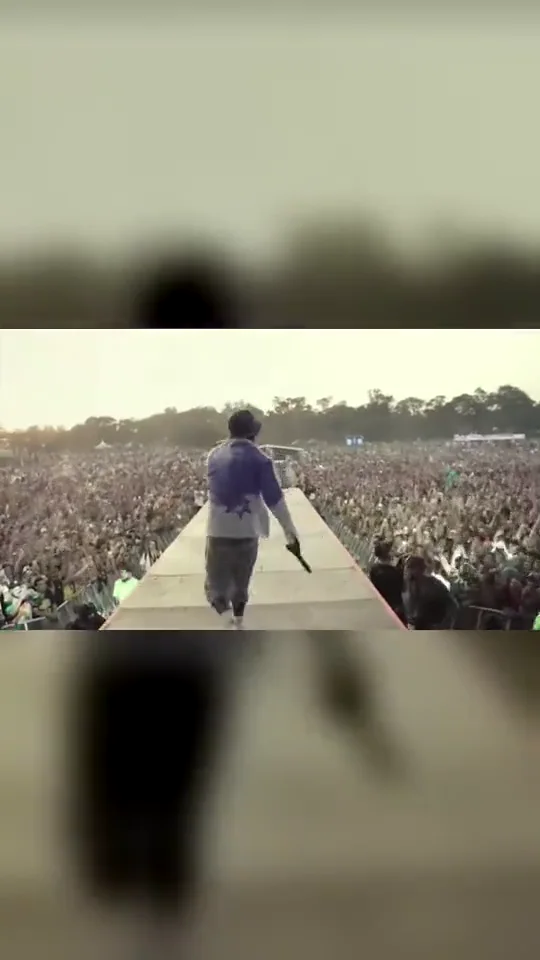
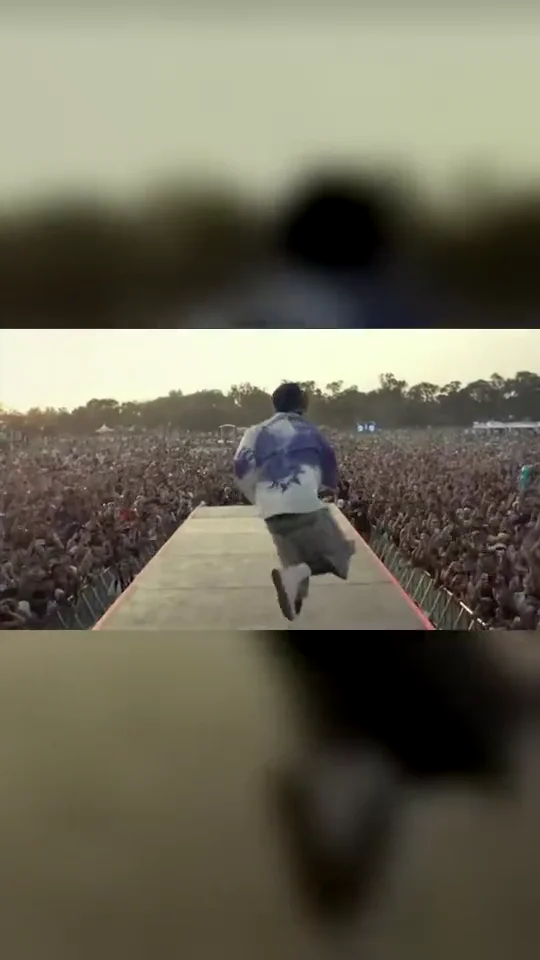
Three excerpts from the same original concert reference. These show the movement each cut follows; they are not results generated by Walkout AI. Counts belong to the source post.
Pricing
Get credits to make your video
Each video costs credits by model and resolution: a standard video (Ultra model, 480p) is 10 credits. Buy a pack once, or subscribe for fresh credits every month. Bigger means cheaper per video.
Basic
100 credits / month · ≈ 10 videos
$29.90/mo
≈ $2.99 / video
- No watermark
- Fresh credits every month
- Unused credits roll over
- Cancel anytime
BasicSave 17%
1200 credits / year · ≈ 120 videos
$24.92/mo
≈ $2.49 / video
Billed $299 yearly
- No watermark
- All year's credits up front
- Credits never expire
- Cancel anytime
ProSave 17%
200 credits / month · ≈ 20 videos
$49.90/mo
≈ $2.50 / video
- No watermark
- Fresh credits every month
- Unused credits roll over
- Cancel anytime
ProSave 30%
2400 credits / year · ≈ 240 videos
$41.58/mo
≈ $2.08 / video
Billed $499 yearly
- No watermark
- All year's credits up front
- Credits never expire
- Cancel anytime
StudioSave 26%
450 credits / month · ≈ 45 videos
$99.90/mo
≈ $2.22 / video
- No watermark
- Fresh credits every month
- Unused credits roll over
- Cancel anytime
StudioSave 38%
5400 credits / year · ≈ 540 videos
$83.25/mo
≈ $1.85 / video
Billed $999 yearly
- No watermark
- All year's credits up front
- Credits never expire
- Cancel anytime
Or buy credits once
Basic: 10 videos a month for $29.90. The Crew Pack is 25 videos for $99, once.
Single
10 credits · ≈ 1 video
$6.99
≈ $6.99 / video
- No watermark
- Download and post anywhere
- Credits never expire
- Failed renders are free
TrioSave 19%
30 credits · ≈ 3 videos
$16.99
≈ $5.66 / video
- No watermark
- Download and post anywhere
- Credits never expire
- Failed renders are free
Duo PackSave 17%
50 credits · ≈ 5 videos
$29
≈ $5.80 / video
- No watermark
- Download and post anywhere
- Credits never expire
- Failed renders are free
Crew PackSave 43%
250 credits · ≈ 25 videos
$99
≈ $3.96 / video
- No watermark
- Download and post anywhere
- Credits never expire
- Failed renders are free
Studio PackSave 53%
600 credits · ≈ 60 videos
$199
≈ $3.32 / video
- No watermark
- Download and post anywhere
- Credits never expire
- Failed renders are free
Label PackSave 60%
1800 credits · ≈ 180 videos
$499
≈ $2.77 / video
- No watermark
- Download and post anywhere
- Credits never expire
- Failed renders are free
The short answer
What is Lil Yachty Walkout AI?
The lil yachty walkout ai effect puts a photo subject into a festival stage entrance: a mic lift, a turn toward the crowd and high steps down a long runway. Walkout AI makes 15-second versions from one photo. The original concert clip became a reusable AI meme: the setting and movement stay familiar while the performer changes. Choose the moment you want, bring your own look, and keep the crowd in the frame.
Walkout AI packages that workflow: one photo in, finished clip out, with no reference video to find and no prompt to write.
The lil yachty walkout ai trend explained, with a timeline →
Three steps
How to do the lil yachty walkout ai trend
No timeline editing and no prompt writing. The clip is already choreographed, you bring the face.
Upload one photo
A clear, front-facing photo that shows your face, hair and the outfit you want to wear in the video.
Pick the template
Choose Backstage Entrance, Crowd Runway or Runway Finale. Preview the reference, then choose the model, resolution and format.
Download and post
Download the 15-second MP4 with its matching trend sound. Review the video and the platform’s music and AI-label rules before posting.
Step-by-step guide: how to make the lil yachty walkout ai video →
Frame by frame
The 15-second shot list
The default Backstage Entrance cut uses the first 15 seconds of the original reference. These are the measured source beats; generated timing and details may vary.
| Time | Beat | What happens |
|---|---|---|
| 0–3s | Backstage | The performer approaches through the shaded stage area, facing the camera. |
| 3–6s | Mic up | The microphone arm lifts as the performer steps into daylight. |
| 6–9s | Crowd reveal | The performer turns toward the long runway and the audience on both sides. |
| 9–12s | High steps | The camera follows the high-stepping movement down the runway. |
| 12–15s | Own the runway | The performer continues down the runway as the crowd fills the background. |
Templates
Pick a template for your video
Same festival. Three different moments. Each cut has its own continuous 15-second reference and matching original audio.
Straight talk
Before you upload
For the best result
- Face the camera, eyes visible, no heavy beauty filter.
- Show hair, shoulders and outfit, not a tight face crop.
- One person per photo, sharp and evenly lit.
Good to know
- Faces get smaller on the runway. The back of your outfit, hands, shoes and crowd details may change; exact likeness and movement are not guaranteed.
- Trend audio is included, but a purchase does not include a commercial music licence or a guarantee that every platform will keep the sound.
Questions
Lil Yachty Walkout AI FAQ
What is Lil Yachty Walkout AI?
Lil Yachty Walkout AI turns a photo into a festival entrance inspired by the viral stage walkout. Walkout AI offers three 15-second cuts of the reference: a backstage entrance, a middle runway section and a finale. The intended result keeps the uploaded person and outfit while recreating the movement; identity and small details can vary.
How do I make a walkout video from my photo?
On Walkout AI, upload one clear photo of yourself or a consenting adult, choose a walkout cut and select your format. Sign in and use credits to generate the 15-second video, then download the MP4. The reference and prompt are already prepared. You do not need a second photo, a camera recording or a typed prompt.
Is Lil Yachty Walkout AI free?
Walkout AI has no free generation tier. The Single pack costs $6.99 for 10 credits, enough for one default Standard 720p video. Packs do not expire, and subscriptions are optional. Check the selected model and resolution before generating, because other settings can require more credits than the default.
Which photo works best for the walkout?
Walkout AI works from one clear photo of one adult with a visible face, hair and outfit. A waist-up or full-body photo gives more information than a tight selfie. Avoid sunglasses, heavy beauty filters, group photos and objects covering the face. Unseen clothing and the back of the head are inferred rather than recovered from the photo.
Does the walkout video include the song?
Walkout AI renders the visual scene silently and then adds the matching audio from the original reference excerpt. The referenced post names Coffin by Lil Yachty. This preserves music and crowd timing for the chosen cut. Buying credits does not give you a separate licence to the song or permission for every commercial use.
Is this a TikTok or CapCut filter?
Walkout AI is an independent website for the Lil Yachty Walkout AI effect, rather than an official TikTok camera filter or a CapCut product. You upload a still photo in the browser and receive a rendered MP4. You can post the file on social platforms after checking their current music and AI-content rules.
Do I need to write a prompt?
Walkout AI supplies the reference clip, the editing instructions and the timing for each 15-second cut. You only provide one photo and choose a cut, model and format. The instructions aim to preserve your face, hair, build and clothes, but video generation can still change details, especially when the performer turns away.
Which AI models does Walkout AI use?
Walkout AI uses ByteDance Seedance models through APIMart, with a RunningHub fallback when available. The choices are Standard using Seedance 2.0 Mini, Fast using Seedance 2.0 Fast, Pro using Seedance 2.0, and Ultra using Seedance 2.5. A more expensive model is not a guarantee of a more accurate face or movement.
How long is the finished video?
Each Walkout AI video is 15 seconds. The source post is longer, so each selection uses a distinct continuous excerpt rather than promising the entire performance. Backstage Entrance covers reference seconds 0 to 15, Crowd Runway 6 to 21, and Runway Finale 12 to 27. Choose the section whose opening and ending you prefer.
Should I choose a vertical or landscape video?
Walkout AI defaults to 16:9 because the original concert scene is wide and the audience occupies both sides of the runway. You can choose 9:16 for a vertical post or 1:1 for a square frame. Those formats may reframe the shot or reduce the visible crowd; review the result before publishing.
What happens if generation fails?
If a Walkout AI render fails or is blocked, the system returns the credits used for that attempt. This is a credit return, not a cash refund. A completed video may still contain imperfect hands, facial details or movement. Check your recent results before submitting the same request again if you lose the connection.
Is Walkout AI affiliated with Lil Yachty?
Walkout AI is independent and is not affiliated with Lil Yachty, Lyrical Lemonade, Summer Smash, TikTok or CapCut. The trend name identifies the kind of stage entrance being recreated. Upload only yourself or a consenting adult, and do not use generated clips to impersonate people or imply an artist endorses you.
How long can I download my video?
Walkout AI keeps the finished file available on this site for 7 days, so download a copy after generation. Completed works transferred to your videosi account may remain there for 30 days. Uploaded source photos are retained on this site for no more than 24 hours; provider handling is described in the privacy policy.